建模方法
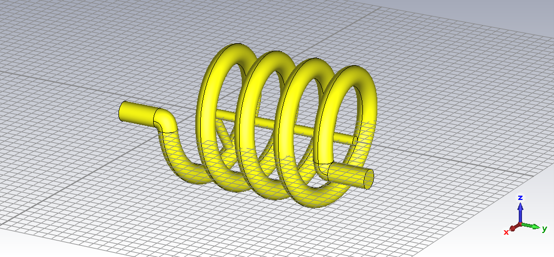
在CST中按照参考中的建模方法建好螺旋线线圈以后,沿螺旋的中轴建一根与螺旋线一样长的圆柱,再创建一根“一端在轴上,另一端在螺旋线上”的圆柱,使其长度保持线圈中径的一半。最后两端加上引脚即可
操作讲起来比较简单。螺旋线可通过 CST 的方程式建模,然后在起始处创建一个圆片,再 sweep curve,也可以只创建一个圆片直接旋转它生成螺旋体。
我们可以通过CST内置的Macro vba editor记录这一过程。因为通常情况下,想在同一个 CST 版本中复制操作历史,需要打开有相关操作的 CST 文件,选择 history list 中的操作点击 copy,在新的文件 paste。但是对于同一个 CST 版本,完全可以将操作用 VB 记录下来,保存为全局脚本,在新的文件中直接运行它。这就是 CST 的 VBA Macro 内置脚本功能的意义。
当然如果你只是直接点击 history list 中的相关操作然后点击 More 中的 Macro,使其自动生成代码,这个方法是有缺陷的。它跟 CST 的内置脚本一样,会记录为一次操作,但是同样的也完全没有模型操作记录。其实秘密藏在文档里,在 CST 的 VB 脚本预设中有一个叫“AddToHistory”的命令会记录模型操作。
现在我们拆解一下 history list,以其中一步操作为例讲解一下如何修改代码。
现在有一步操作叫“Define curve circle: curve1:circle1”,在 history list 中点击打开详情,可以看到如下这段代码。
With Circle
     .Reset
     .Name "circle1"
     .Curve "curve1"
     .Radius "wire_d/2"
     .Xcenter "r"
     .Ycenter "0"
     .Segments "0"
     .Create
End With
当我们在 history list 中点击copy复制这一个 history 项时,打开系统的剪贴板你会发现,它其实是一个JSON格式文本;但在 CST 软件内部执行时,软件会提取其中的 code 字段,将其当作 VBA 脚本 交由解释器运行,从而在 3D 界面中重绘出模型。这是 CST 进行无界面自动化建模的标准数据交换方式。复制 history list 中的该操作得到的代码如下所示。
CST History Data Exchange Format V2

{
    "history": [
        {
            "caption": "Define curve circle: curve1:circle1",
            "version": "2025.1|34.0.1|20241028",
            "hidden": false,
            "type": "vba",
            "code": [
                "With Circle\r",
                "     .Reset\r",
                "     .Name \"circle1\"\r",
                "     .Curve \"curve1\"\r",
                "     .Radius \"wire_d/2\"\r",
                "     .Xcenter \"r\"\r",
                "     .Ycenter \"0\"\r",
                "     .Segments \"0\"\r",
                "     .Create\r",
                "End With"
            ]
        }
    ]
}
现在我们在 history list 界面点击 Macro 将其转化为 VB 代码,生成的代码如下所示。
' Macro

Sub Main ()


'## Merged Block - Define curve circle: curve1:circle1
StartVersionStringOverrideMode "2025.1|34.0.1|20241028"
With Circle

     .Reset

     .Name "circle1"

     .Curve "curve1"

     .Radius "wire_d/2"

     .Xcenter "r"

     .Ycenter "0"

     .Segments "0"

     .Create

End With
StopVersionStringOverrideMode
End Sub
阅读这段代码你会发现:操作内容包裹在 With 到 End With 之间;主程序内容从 StartVersionStringOverrideMode 开始,到 StopVersionStringOverrideMode 结束,在 StartVersionStringOverrideMode 这行的后面是这段代码兼容的 CST 版本;这段代码的 history 名称在“Merged Block”这一行,而“Merged Block”的意思是“合并块”,因此生成的代码是无法编辑的块命令。
想让它在 history list 和 history list (fast model update) 中可编辑,必须将“Merged Block””改为“AddToHistory”,然后在后面再加上“, (String)”,设置一个变量名作为 String,然后将上面的操作赋给 String,这样方能处理多个操作历史。
以下是 CST 中创建螺旋线圈电感的 VBA 代码。
'#Language "WWB-COM"

Option Explicit

Sub Main ()
    StartVersionStringOverrideMode "2025.2|34.0.1|20241216"

    Dim cmd As String

    '===========================================================
    ' Step 1: 定义材料 Copper (annealed)
    '===========================================================
    cmd = "With Material" & vbCrLf & _
          "     .Reset" & vbCrLf & _
          "     .Name ""Copper (annealed)""" & vbCrLf & _
          "     .Folder """"" & vbCrLf & _
          "     .FrqType ""static""" & vbCrLf & _
          "     .Type ""Normal""" & vbCrLf & _
          "     .SetMaterialUnit ""Hz"", ""mm""" & vbCrLf & _
          "     .Epsilon ""1""" & vbCrLf & _
          "     .Mu ""1.0""" & vbCrLf & _
          "     .Kappa ""5.8e+007""" & vbCrLf & _
          "     .TanD ""0.0""" & vbCrLf & _
          "     .TanDFreq ""0.0""" & vbCrLf & _
          "     .TanDGiven ""False""" & vbCrLf & _
          "     .TanDModel ""ConstTanD""" & vbCrLf & _
          "     .KappaM ""0""" & vbCrLf & _
          "     .TanDM ""0.0""" & vbCrLf & _
          "     .TanDMFreq ""0.0""" & vbCrLf & _
          "     .TanDMGiven ""False""" & vbCrLf & _
          "     .TanDMModel ""ConstTanD""" & vbCrLf & _
          "     .DispModelEps ""None""" & vbCrLf & _
          "     .DispModelMu ""None""" & vbCrLf & _
          "     .DispersiveFittingSchemeEps ""Nth Order""" & vbCrLf & _
          "     .DispersiveFittingSchemeMu ""Nth Order""" & vbCrLf & _
          "     .UseGeneralDispersionEps ""False""" & vbCrLf & _
          "     .UseGeneralDispersionMu ""False""" & vbCrLf & _
          "     .FrqType ""all""" & vbCrLf & _
          "     .Type ""Lossy metal""" & vbCrLf & _
          "     .SetMaterialUnit ""GHz"", ""mm""" & vbCrLf & _
          "     .Mu ""1.0""" & vbCrLf & _
          "     .Kappa ""5.8e+007""" & vbCrLf & _
          "     .Rho ""8930.0""" & vbCrLf & _
          "     .ThermalType ""Normal""" & vbCrLf & _
          "     .ThermalConductivity ""401.0""" & vbCrLf & _
          "     .SpecificHeat ""390"", ""J/K/kg""" & vbCrLf & _
          "     .MetabolicRate ""0""" & vbCrLf & _
          "     .BloodFlow ""0""" & vbCrLf & _
          "     .VoxelConvection ""0""" & vbCrLf & _
          "     .MechanicsType ""Isotropic""" & vbCrLf & _
          "     .YoungsModulus ""120""" & vbCrLf & _
          "     .PoissonsRatio ""0.33""" & vbCrLf & _
          "     .ThermalExpansionRate ""17""" & vbCrLf & _
          "     .Colour ""1"", ""1"", ""0""" & vbCrLf & _
          "     .Wireframe ""False""" & vbCrLf & _
          "     .Reflection ""False""" & vbCrLf & _
          "     .Allowoutline ""True""" & vbCrLf & _
          "     .Transparentoutline ""False""" & vbCrLf & _
          "     .Transparency ""0""" & vbCrLf & _
          "     .Create" & vbCrLf & _
          "End With"
    AddToHistory "Define material: Copper (annealed)", cmd

    '===========================================================
    ' Step 2: 定义曲线 circle1
    '===========================================================
    cmd = "With Circle" & vbCrLf & _
          "     .Reset" & vbCrLf & _
          "     .Name ""circle1""" & vbCrLf & _
          "     .Curve ""curve1""" & vbCrLf & _
          "     .Radius ""wire_d/2""" & vbCrLf & _
          "     .Xcenter ""r""" & vbCrLf & _
          "     .Ycenter ""0""" & vbCrLf & _
          "     .Segments ""0""" & vbCrLf & _
          "     .Create" & vbCrLf & _
          "End With"
    AddToHistory "Define curve circle: curve1:circle1", cmd

    '===========================================================
    ' Step 3: 新建组件 component1
    '===========================================================
    cmd = "Component.New ""component1"""
    AddToHistory "New component: component1", cmd

    '===========================================================
    ' Step 4: 定义 CoverProfile solid1
    '===========================================================
    cmd = "With CoverCurve" & vbCrLf & _
          "     .Reset" & vbCrLf & _
          "     .Name ""solid1""" & vbCrLf & _
          "     .Component ""component1""" & vbCrLf & _
          "     .Material ""Copper (annealed)""" & vbCrLf & _
          "     .Curve ""curve1:circle1""" & vbCrLf & _
          "     .DeleteCurve ""True""" & vbCrLf & _
          "     .Create" & vbCrLf & _
          "End With"
    AddToHistory "Define coverprofile: component1:solid1", cmd

    '===========================================================
    ' Step 5: 拾取面
    '===========================================================
    cmd = "Pick.PickFaceFromId ""component1:solid1"", ""1"""
    AddToHistory "Pick face", cmd

    '===========================================================
    ' Step 6: 设置边
    '===========================================================
    cmd = "Pick.AddEdge ""0.0"", ""0.0"", ""0.0"", ""0.0"", ""10"", ""0.0"""
    AddToHistory "Set edge", cmd

    '===========================================================
    ' Step 7: 定义旋转体 solid2
    '===========================================================
    cmd = "With Rotate" & vbCrLf & _
          "     .Reset" & vbCrLf & _
          "     .Name ""solid2""" & vbCrLf & _
          "     .Component ""component1""" & vbCrLf & _
          "     .NumberOfPickedFaces ""1""" & vbCrLf & _
          "     .Material ""Copper (annealed)""" & vbCrLf & _
          "     .Mode ""Picks""" & vbCrLf & _
          "     .Angle ""n*360""" & vbCrLf & _
          "     .Height ""H""" & vbCrLf & _
          "     .RadiusRatio ""1.0""" & vbCrLf & _
          "     .TaperAngle ""0.0""" & vbCrLf & _
          "     .NSteps ""0""" & vbCrLf & _
          "     .SplitClosedEdges ""True""" & vbCrLf & _
          "     .SegmentedProfile ""False""" & vbCrLf & _
          "     .DeleteBaseFaceSolid ""False""" & vbCrLf & _
          "     .ClearPickedFace ""True""" & vbCrLf & _
          "     .SimplifySolid ""True""" & vbCrLf & _
          "     .UseAdvancedSegmentedRotation ""True""" & vbCrLf & _
          "     .CutEndOff ""False""" & vbCrLf & _
          "     .Create" & vbCrLf & _
          "End With"
    AddToHistory "Define rotate: component1:solid2", cmd

    '===========================================================
    ' Step 8: 定义圆柱体 solid3
    '===========================================================
    cmd = "With Cylinder" & vbCrLf & _
          "     .Reset" & vbCrLf & _
          "     .Name ""solid3""" & vbCrLf & _
          "     .Component ""component1""" & vbCrLf & _
          "     .Material ""Copper (annealed)""" & vbCrLf & _
          "     .OuterRadius ""10""" & vbCrLf & _
          "     .InnerRadius ""0.0""" & vbCrLf & _
          "     .Axis ""y""" & vbCrLf & _
          "     .Yrange ""0"", ""H""" & vbCrLf & _
          "     .Xcenter ""0""" & vbCrLf & _
          "     .Zcenter ""0""" & vbCrLf & _
          "     .Segments ""0""" & vbCrLf & _
          "     .Create" & vbCrLf & _
          "End With"
    AddToHistory "Define cylinder: component1:solid3", cmd

    '===========================================================
    ' Step 9: 定义参数 h2 (直接执行,不进历史)
    '===========================================================
    ' StoreDoubleParameter "h2", "0"

    '===========================================================
    ' Step 10: 创建沿X轴的圆柱 cylinder_radial
    '===========================================================
    cmd = "With Cylinder" & vbCrLf & _
          "     .Reset" & vbCrLf & _
          "     .Name ""cylinder_radial""" & vbCrLf & _
          "     .Component ""component1""" & vbCrLf & _
          "     .Material ""Copper (annealed)""" & vbCrLf & _
          "     .OuterRadius ""10""" & vbCrLf & _
          "     .InnerRadius ""0.0""" & vbCrLf & _
          "     .Axis ""x""" & vbCrLf & _
          "     .Xrange ""0"", ""r""" & vbCrLf & _
          "     .Ycenter ""h2""" & vbCrLf & _
          "     .Zcenter ""0""" & vbCrLf & _
          "     .Segments ""0""" & vbCrLf & _
          "     .Create" & vbCrLf & _
          "End With"
    AddToHistory "Create cylinder along X at h2", cmd

    '===========================================================
    ' Step 11: Transform旋转圆柱对齐螺旋线方向
    '===========================================================
    cmd = "With Transform" & vbCrLf & _
          "     .Reset" & vbCrLf & _
          "     .Name ""component1:cylinder_radial""" & vbCrLf & _
          "     .Origin ""Free""" & vbCrLf & _
          "     .Center ""0"", ""h2"", ""0""" & vbCrLf & _
          "     .Angle ""0"", ""360*n*h2/H"", ""0""" & vbCrLf & _
          "     .MultipleObjects ""False""" & vbCrLf & _
          "     .GroupObjects ""False""" & vbCrLf & _
          "     .Repetitions ""1""" & vbCrLf & _
          "     .MultipleSelection ""False""" & vbCrLf & _
          "     .AutoDestination ""True""" & vbCrLf & _
          "     .Transform ""Shape"", ""Rotate""" & vbCrLf & _
          "End With"
    AddToHistory "Rotate cylinder toward helix", cmd

    '===========================================================
    ' Step 12: 定义螺旋线径向线
    '===========================================================
    cmd = "With Polygon3D" & vbCrLf & _
          "     .Reset" & vbCrLf & _
          "     .Version 10" & vbCrLf & _
          "     .Name ""3dpolygon_1""" & vbCrLf & _
          "     .Curve ""3D-Analytical""" & vbCrLf & _
          "     .Point ""0"", ""h2"", ""0""" & vbCrLf & _
          "     .Point ""10*cos(2*pi*3*h2/30)"", ""h2"", ""-10*sin(2*pi*3*h2/30)""" & vbCrLf & _
          "     .Create" & vbCrLf & _
          "End With"
    AddToHistory "Radial Line at h2", cmd

    '===========================================================
    ' Step 13: 起始端圆柱 solid4 (向下延伸)
    '===========================================================
    cmd = "With Cylinder" & vbCrLf & _
          "     .Reset" & vbCrLf & _
          "     .Name ""solid4""" & vbCrLf & _
          "     .Component ""component1""" & vbCrLf & _
          "     .Material ""Copper (annealed)""" & vbCrLf & _
          "     .OuterRadius ""wire_d/2""" & vbCrLf & _
          "     .InnerRadius ""0.0""" & vbCrLf & _
          "     .Axis ""y""" & vbCrLf & _
          "     .Yrange ""-100"", ""-wire_d/2-0.4""" & vbCrLf & _
          "     .Xcenter ""r""" & vbCrLf & _
          "     .Zcenter ""wire_d/2""" & vbCrLf & _
          "     .Segments ""0""" & vbCrLf & _
          "     .Create" & vbCrLf & _
          "End With"
    AddToHistory "Define cylinder: component1:solid4 (start cap)", cmd

    '===========================================================
    ' Step 14: 拾取 solid2 起始端面 face 4
    '===========================================================
    cmd = "Pick.PickFaceFromId ""component1:solid2"", ""4"""
    AddToHistory "Pick face: component1:solid2 face 4", cmd

    '===========================================================
    ' Step 15: 拾取 solid4 端面 face 3
    '===========================================================
    cmd = "Pick.PickFaceFromId ""component1:solid4"", ""3"""
    AddToHistory "Pick face: component1:solid4 face 3", cmd

    '===========================================================
    ' Step 16: Loft连接起始端 solid5
    '===========================================================
    cmd = "With Loft" & vbCrLf & _
          "     .Reset" & vbCrLf & _
          "     .Name ""solid5""" & vbCrLf & _
          "     .Component ""component1""" & vbCrLf & _
          "     .Material ""Copper (annealed)""" & vbCrLf & _
          "     .Tangency ""0.2""" & vbCrLf & _
          "     .Minimizetwist ""true""" & vbCrLf & _
          "     .CreateNew" & vbCrLf & _
          "End With"
    AddToHistory "Define loft: component1:solid5 (start cap)", cmd

    '===========================================================
    ' Step 17: 末端圆柱 solid6 (向上延伸)
    ' Xcenter = r*cos(2*pi*n): n整数时为 r,n半圈时为 -r,自动适配
    ' Zcenter = -wire_d/2*cos(2*pi*n): n整数时为 -wire_d/2,n半圈时为 wire_d/2
    '===========================================================
    cmd = "With Cylinder" & vbCrLf & _
          "     .Reset" & vbCrLf & _
          "     .Name ""solid6""" & vbCrLf & _
          "     .Component ""component1""" & vbCrLf & _
          "     .Material ""Copper (annealed)""" & vbCrLf & _
          "     .OuterRadius ""wire_d/2""" & vbCrLf & _
          "     .InnerRadius ""0.0""" & vbCrLf & _
          "     .Axis ""y""" & vbCrLf & _
          "     .Yrange ""H+wire_d/2+0.4"", ""H+100""" & vbCrLf & _
          "     .Xcenter ""r*cos(2*pi*n)""" & vbCrLf & _
          "     .Zcenter ""-wire_d/2*cos(2*pi*n)""" & vbCrLf & _
          "     .Segments ""0""" & vbCrLf & _
          "     .Create" & vbCrLf & _
          "End With"
    AddToHistory "Define cylinder: component1:solid6 (end cap)", cmd

    '===========================================================
    ' Step 18: 拾取 solid2 末端端面 face 3
    '===========================================================
    cmd = "Pick.PickFaceFromId ""component1:solid2"", ""3"""
    AddToHistory "Pick face: component1:solid2 face 3", cmd

    '===========================================================
    ' Step 19: 拾取 solid6 端面 face 1
    '===========================================================
    cmd = "Pick.PickFaceFromId ""component1:solid6"", ""1"""
    AddToHistory "Pick face: component1:solid6 face 1", cmd

    '===========================================================
    ' Step 20: Loft连接末端 solid7
    '===========================================================
    cmd = "With Loft" & vbCrLf & _
          "     .Reset" & vbCrLf & _
          "     .Name ""solid7""" & vbCrLf & _
          "     .Component ""component1""" & vbCrLf & _
          "     .Material ""Copper (annealed)""" & vbCrLf & _
          "     .Tangency ""0.2""" & vbCrLf & _
          "     .Minimizetwist ""true""" & vbCrLf & _
          "     .CreateNew" & vbCrLf & _
          "End With"
    AddToHistory "Define loft: component1:solid7 (end cap)", cmd

    StopVersionStringOverrideMode
End Sub
上面这段代码实现效果如下图所示。
参考
电磁仿真–基本操作-CST-(4)-复杂空心电感
电磁仿真–基本操作-CST-(4)-复杂空心电感
[待整理] 如何用CST建立螺旋的模型
如何用CST建立螺旋的模型
CST中如何建立螺旋线